UTM parameters are short text snippets added to the end of a URL that tell your analytics tools exactly where a website visitor came from — which campaign, which channel, which piece of content, and which specific link they clicked. Without them, traffic from your email campaigns, paid ads, and social posts all arrives in your analytics as undifferentiated sessions, making meaningful attribution nearly impossible.
For marketing teams that need to justify budget, prove ROI, and make confident decisions about where to invest next, UTM parameters are one of the most powerful and underused tools available. Setting them up correctly takes a small amount of upfront effort. Using them consistently transforms your analytics from a vanity dashboard into a genuine decision-making engine.
This guide covers everything you need to know: what UTM parameters are, how each of the five parameter types works, where to use them, naming convention best practices, common mistakes to avoid, and how to analyse the data they generate — including inside Ortto.
Key stat: Only 44% of marketers consistently use UTM parameters across all campaigns — meaning more than half are making budget and strategy decisions without accurate attribution data. (HubSpot State of Marketing, 2025)
What are UTM parameters?
UTM stands for Urchin Tracking Module — a reference to Urchin Software, the web analytics company Google acquired in 2005 to build what became Google Analytics. UTM parameters (also called UTM codes or UTM tags) are query string fragments appended to the end of a URL.
When a user clicks a UTM-tagged link, the parameters in the URL are captured by your analytics platform — whether that's Google Analytics 4, Ortto, or another tool — and associated with that user's session. This lets you see not just that someone visited your website, but precisely which campaign, channel, and content piece brought them there.
A complete UTM-tagged URL looks like this:
https://ortto.com/demo/?utm_source=linkedin&utm_medium=paid-social&utm_campaign=q2-launch&utm_content=cta-button
Each parameter after the '?' is a UTM tag. Multiple parameters are joined by '&'. Together they tell a complete story about how this particular click was generated.
Key stat: Marketers who use multi-touch attribution — enabled by consistent UTM tagging — are 15% more likely to exceed their revenue goals. (Forrester Research, 2024)
A complete UTM example
Here is a real-world UTM-tagged URL, showing all five parameters working together to tell the full attribution story of a single click:
https://ortto.com/demo/?utm_source=google&utm_medium=cpc&utm_campaign=q2-brand&utm_content=headline-a&utm_term=marketing-automation
Reading this URL, your analytics platform learns:
utm_source=google: The click came from Google.
utm_medium=cpc: It was a paid search ad (cost-per-click).
utm_campaign=q2-brand: It belongs to the Q2 brand campaign.
utm_content=headline-a: It was the 'headline A' creative variant being tested.
utm_term=marketing-automation: The user searched for 'marketing automation' before clicking.
This single URL tells a complete story that lets you compare headline A vs headline B, measure paid search against paid social, and attribute revenue to the Q2 brand campaign specifically — not just 'Google' as a broad channel.
Where to use UTM parameters
UTMs should be applied to all outbound marketing links — every link you share outside your own website. Here are the most important use cases:
Email marketing
Tag every link in your email campaigns with at least utm_source=email, a medium that distinguishes the email type (e.g. utm_medium=newsletter vs utm_medium=lifecycle), and a campaign identifier. Use utm_content to differentiate between multiple CTAs in the same email — for example, a header image link vs a button CTA. Ortto automatically applies UTM tags to all links in your email campaigns, saving manual tagging effort while keeping your naming conventions consistent.
utm_source=email
utm_medium=newsletter
utm_campaign=april-product-update
utm_content=hero-cta
Paid social
Each ad platform (Meta, LinkedIn, TikTok) needs UTM tags on destination URLs so your analytics can distinguish paid social from organic social — and distinguish campaigns from one another within the same platform. Use utm_content to differentiate ad creatives or audience variants within the same campaign.
utm_source=linkedin
utm_medium=paid-social
utm_campaign=q2-demo-push
utm_content=video-testimonial
Paid search (PPC)
For Google Ads and Microsoft Ads, use utm_term to track which keywords drive clicks and conversions. Most platforms can auto-populate this using dynamic parameters — check your account settings. Always distinguish paid search from organic using utm_medium=cpc.
utm_source=google
utm_medium=cpc
utm_campaign=brand-terms
utm_term=ortto-marketing-automation
Content partnerships and syndication
When a partner website, media outlet, or guest post includes a link to your site, tag it with a unique utm_source and utm_medium so you can measure exactly how much traffic and revenue each partnership generates. This data is essential for evaluating partnership ROI and renewal decisions.
utm_source=techcrunch
utm_medium=content-syndication
utm_campaign=thought-leadership-q2
Influencer and affiliate marketing
Give each influencer or affiliate their own unique utm_source value. This lets you measure the exact traffic, signups, and revenue each one drives — making performance reviews and commission calculations straightforward.
utm_source=influencer-jane-smith
utm_medium=social
utm_campaign=spring-launch
Local SEO and business listings
Tag the website URL in your Google Business Profile, Yelp listing, or other directory entries so you can measure how much traffic these local touchpoints generate — often an undertracked source of qualified leads. Use utm_medium=organic and utm_source=google-business-profile to keep these visits correctly categorised.
UTM parameter best practices
Inconsistent UTM tagging is worse than no tagging at all — it corrupts your data and makes attribution reports untrustworthy. These seven practices will keep your UTM data clean and your attribution reports reliable.
1. Always use lowercase
UTM parameters are case-sensitive. utm_source=LinkedIn and utm_source=linkedin are treated as two different sources in GA4 and most analytics tools — splitting your data and understating the true performance of that channel. Always use lowercase for every UTM value, without exception.
2. Use dashes, not spaces or underscores
Spaces in UTM values are converted to %20 in URLs, which creates messy, hard-to-read strings and can cause tracking errors. Underscores work but create ambiguity in some tools. Dashes are the clearest, most URL-safe convention: utm_campaign=q2-product-launch, not utm_campaign=q2 product launch or utm_campaign=q2_product_launch. Pick one separator and use it everywhere.
3. Be descriptive, not cryptic
UTM values should be human-readable by anyone looking at your analytics report months later. utm_campaign=1A-Q2 means nothing without a decoder. utm_campaign=q2-demo-push is self-explanatory. The goal is for anyone on your team to understand the full attribution story just by reading the UTM string.
4. Don't repeat information across parameters
Each parameter should tell you something the others don't. If utm_source=linkedin already tells you the platform, utm_medium=linkedin-paid is redundant — use utm_medium=paid-social instead. A well-constructed UTM reads like a sentence: source=google | medium=cpc | campaign=brand-q2 | content=headline-a answers a clear question at each level.
5. Never tag internal links
This is the single most damaging UTM mistake. If you add UTM parameters to links within your own website, any visitor who clicks one will have their session re-attributed to that UTM source — losing all information about where they originally came from. UTMs should only appear on outbound links: emails, ads, social posts, and external partner content. Never on navigation links, blog post internal links, or any URL that points to your own domain.
6. Document your naming conventions in a shared system
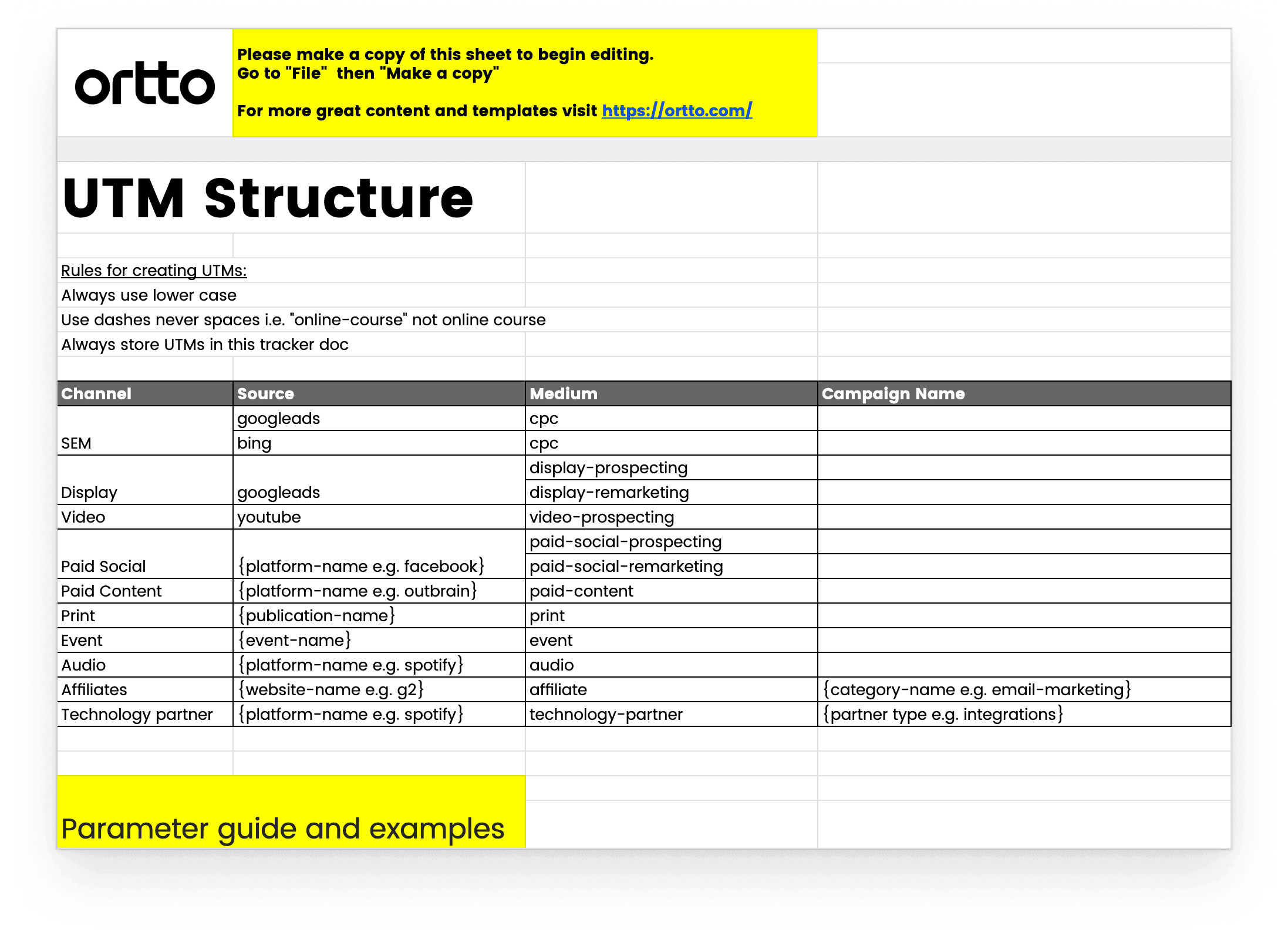
UTM tagging only works as a team sport. If one person uses utm_source=fb and another uses utm_source=facebook and a third uses utm_source=meta, your Facebook data is fragmented across three sources. Maintain a shared UTM naming convention document — or use a UTM builder spreadsheet — that the whole team follows. Ortto's UTM builder template provides a ready-to-use structure with examples and naming conventions built in.
7. Test every tagged URL before launch
Before a campaign goes live, click the tagged URL and check two things: (1) the UTM parameters appear correctly in your browser's address bar, and (2) the visit registers correctly in your analytics platform with the expected source, medium, and campaign values. For large campaigns, spot-check a sample of tagged URLs across different placements. Catching a broken UTM before launch is infinitely easier than diagnosing missing attribution data after the fact.
How Ortto supports UTM tracking and attribution
Ortto's analytics platform is built to make UTM-based attribution actionable — not just for aggregate campaign reporting, but at the individual contact level.
Automatic UTM tagging in email campaigns: Ortto automatically applies UTM parameters to all links in your email campaigns, keeping your naming conventions consistent without manual effort on every send.
Contact-level attribution: UTM data is captured and stored against each individual contact's profile in Ortto's CDP — so you can see the specific campaign and channel that first acquired or converted each lead, trial user, or customer.
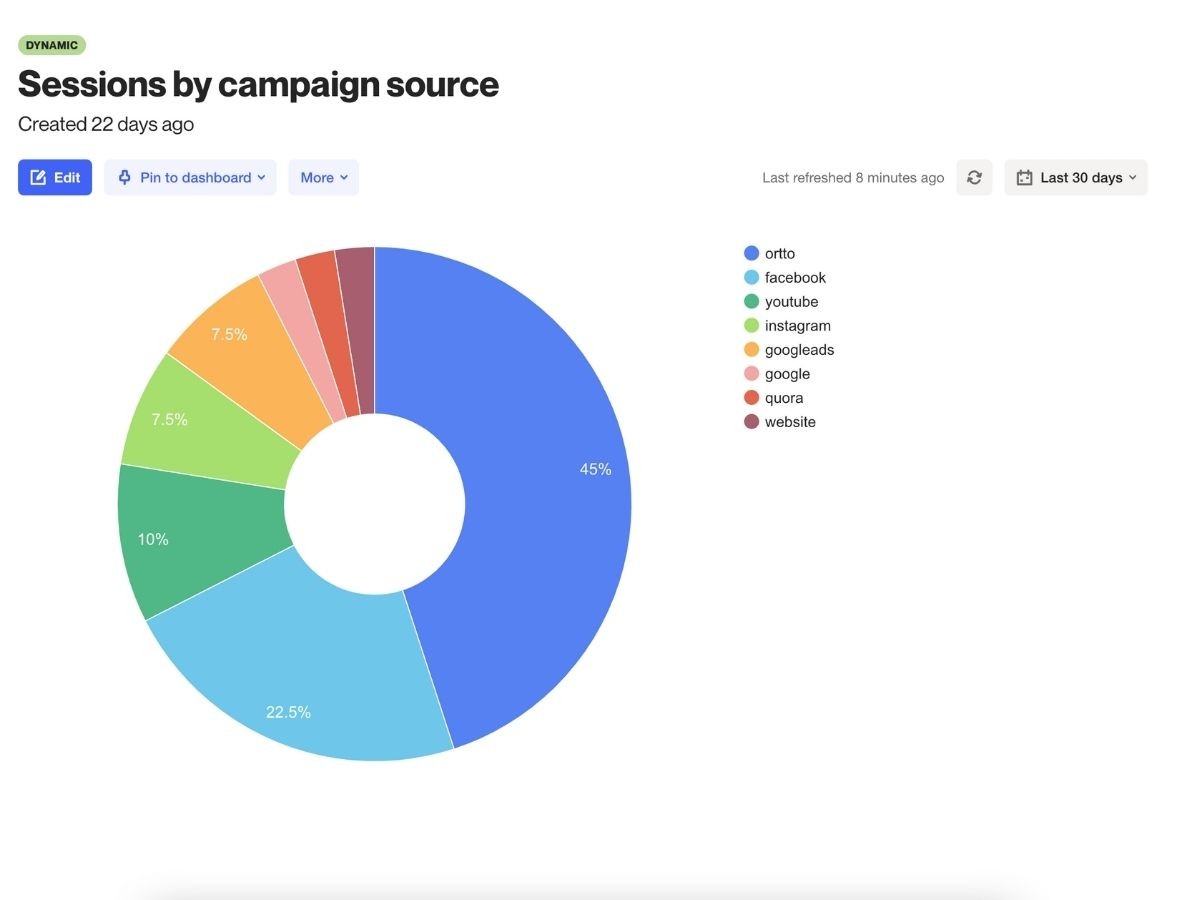
Campaign performance reporting: Track traffic, signups, trial activations, and revenue by utm_source, utm_medium, and utm_campaign — across email, SMS, and multi-channel journeys.
Multi-touch attribution: Ortto's analytics support attribution modelling beyond last-click — giving credit to upper-funnel and mid-funnel touchpoints that contribute to conversion but don't always get the last click.
Checkmate tracking®: Ortto's first-party tracking technology captures session data even when third-party cookies are blocked — ensuring your UTM attribution remains accurate as browser privacy restrictions tighten.
Ortto tip: Use Ortto's contact-level UTM data to build audience segments based on acquisition source — for example, 'all contacts acquired via LinkedIn paid social in Q2'. These segments can feed directly into tailored nurture journeys, ensuring the message each lead receives matches the channel and campaign that brought them in.
→ See how Ortto tracks and reports UTM attribution — Book a demo
Tools for building and managing UTM parameters
Ortto UTM builder template
Ortto's free UTM builder spreadsheet provides a ready-to-use structure for generating UTM-tagged URLs consistently across your team. The first tab documents your naming conventions and parameter examples. The second tab is a live builder where you enter your URL, source, medium, campaign, content, and term values — and the template automatically generates the complete tagged URL. Copy it for your team and customise the naming convention tab to match your own standards.
Google Campaign URL Builder
Google's free Campaign URL Builder (available at ga-dev-tools.web.app) lets you input your campaign details and generates the complete UTM-tagged URL instantly. It includes a 'Convert URL to Short Link' option to shorten long UTM strings before sharing — useful for social posts where link length is visible to the reader.
Marketing automation platforms
Many marketing automation platforms — including Ortto — automatically apply UTM tags to email and SMS campaign links. This removes the manual tagging step for your highest-volume channel and ensures consistency without relying on each team member to follow naming conventions manually. Check your platform's settings to confirm UTM auto-tagging is enabled and that the default parameter values match your naming conventions.
Frequently asked questions
What does UTM stand for?
UTM stands for Urchin Tracking Module. The name comes from Urchin Software, a web analytics company acquired by Google in 2005 that formed the foundation of what became Google Analytics. The UTM parameter format Urchin developed is still the standard for campaign tracking across virtually all analytics platforms today.
What are the five UTM parameters?
The five standard UTM parameters are: utm_source (the platform or origin of the click, e.g. google or linkedin), utm_medium (the marketing channel, e.g. cpc or email), utm_campaign (the campaign identifier, e.g. q2-product-launch), utm_content (the specific content or creative variant, used for A/B testing), and utm_term (the paid search keyword, used in paid search campaigns only). Only utm_source is required — the others are optional but recommended for granular attribution.
Do UTM parameters affect SEO?
UTM parameters do not directly affect your website's SEO ranking. However, they can create duplicate content issues if search engines index the same URL with different UTM strings as separate pages. To prevent this, ensure your canonical tags point to the clean URL (without UTM parameters) on all pages. Most modern CMS platforms handle this automatically, but it's worth confirming with your development team.
What is the difference between utm_source and utm_medium?
utm_source identifies where the click came from — the specific platform or publisher (e.g. google, linkedin, newsletter). utm_medium identifies how the link was delivered — the marketing channel type (e.g. cpc, paid-social, email). Together they answer two different questions: 'where did this visit come from?' (source) and 'what type of marketing generated it?' (medium). Both should always be used together.
Should I use UTM parameters on internal links?
No — never add UTM parameters to internal links (links between pages on your own website). If a visitor clicks an internal UTM-tagged link, their session is re-attributed to that UTM source, wiping out all information about where they originally came from. UTMs should only appear on outbound links: emails, ads, social posts, and external partner content.
What happens to UTM data in Ortto?
In Ortto, UTM parameters from every link click are automatically captured and stored against the individual contact's profile in the CDP. This means you can see not just aggregate campaign performance, but the specific acquisition source for every lead, trial user, or customer — and use that data to build segments, trigger personalised journeys, and measure true revenue attribution by channel and campaign.
How do I keep UTM naming conventions consistent across a team?
The most effective approach is a shared UTM builder document or spreadsheet that defines your naming conventions — approved values for utm_source, utm_medium, and utm_campaign — and provides a URL builder that generates compliant tagged URLs automatically. Ortto provides a free UTM builder template for this purpose. For email campaigns, enabling automatic UTM tagging in your marketing automation platform removes the manual step entirely for your highest-volume channel.
Can UTM parameters work with GA4?
Yes — GA4 natively reads and reports on all five standard UTM parameters. UTM data appears in GA4's Traffic Acquisition reports under Source/Medium and Campaign dimensions. GA4 also supports additional parameters like utm_id and utm_source_platform introduced with the GA4 migration. If you are migrating from Universal Analytics to GA4, your existing UTM naming conventions will carry forward without changes.
Final word
UTM parameters are one of the simplest, highest-leverage tools in a marketer's attribution toolkit. The upfront investment — agreeing on naming conventions, setting up a shared builder, enabling auto-tagging in your email platform — pays back every time you look at a campaign report and know with confidence which channel, campaign, and creative drove each result.
For teams using Ortto, UTM attribution runs through the entire platform — from automatic tagging in email campaigns, to contact-level source tracking in the CDP, to multi-touch attribution in campaign analytics. The result is a complete, accurate picture of how your marketing drives growth — and the data you need to make confident decisions about where to invest next.
→ Book a demo to see Ortto's attribution and analytics in action